
A date, not a warning.
See the first low point, the exact day, and the projected amount.
Private cash forecast · 8 weeks ahead
CashGapRadar is a private 8-week personal cash flow forecast that shows when your balance may run short — before the gap happens. No bank connection required.
Live web version now · Android at $2,000 · iOS at a cumulative $5,000
See how it works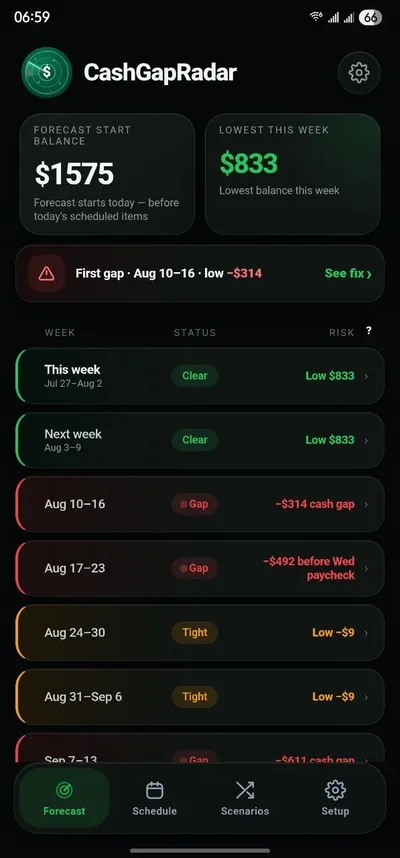
The month can look fine. The day can still fail.
It does not coach, shame, or sell an advance. It reads the schedule you enter and gives you enough lead time to act.
See the first low point, the exact day, and the projected amount.
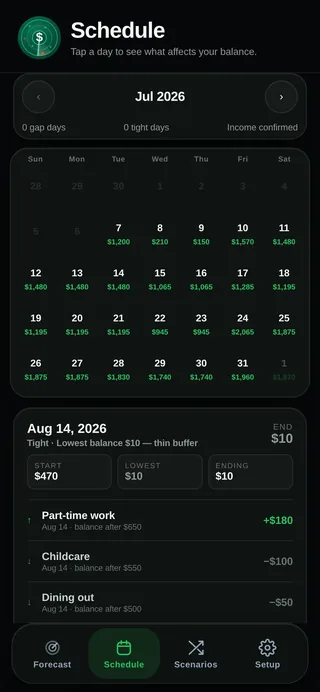
Open the day and see every income and payment in order.
Test a different payment date before changing your real plan.
A real read-out from the live demo
The numbers below come from CashGapRadar's own demo data, not a promotional mockup.
Lowest projected balance · Aug 15, after groceries
Move the car registration to after August 15.
The forecast clears without a loan, an advance, or a new budget.
Remaining shortfall: covered ✓Read the day
Open any date to see income, scheduled payments, and the balance left after each one. No transaction diary required.
Rehearse uncertainty
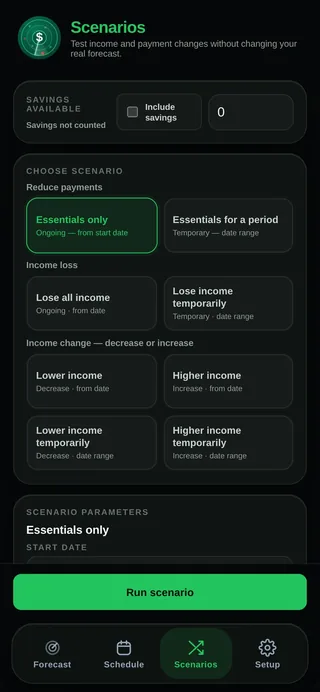
Reduce income. Add a repair. Cut to essentials. Run the scenario against the forecast without touching your real numbers.
Built independently
CashGapRadar started as a practical way to answer one question: will the timing of upcoming bills create a negative gap before the next income arrives?
The product is deliberately manual and local. Ten minutes of setup replaces a permanent bank connection, daily tracking, and a server holding your financial data.
Built by Oleksii Kotelevskyi, a CFO with more than 15 years in holding, manufacturing, and trading companies, where cash-gap forecasting is a weekly discipline. CashGapRadar brings the same short-horizon treasury view to a personal balance.
Privacy you can test
Every calculation runs on the device in front of you. There is no financial account, no bank aggregator, and no analytics inside the app.
Content-Security-Policy: connect-src 'none'This is architecture, not a promise hidden in a policy page.
Open it now. The core forecast, scenarios, and local backup already exist.
The planned mobile launch will be funded directly instead.
Public launch plan
The current PWA remains the proof. Further localization, calendar migration, native notifications, device testing, and store release are paused until the milestones are reached.
Progress is updated from the public Ko-fi goal. Contributions are collected immediately by Ko-fi.
The original stable configuration is already online.
Funds Google Play release and Android-specific completion.
Funds the App Store release and completes the international calendar layer.
Free tools & guides
Use a local calculator, learn how short-term cash forecasting works, or plan around irregular income. No bank login is required.
Project your lowest balance and first possible cash gap over the next 8 weeks.
Calculate your future balance → GuideSee why the timing of bills and income can matter more than the monthly total.
Learn the method → Quick checkCheck whether upcoming bills may push your balance below zero before payday.
Check the gap →Questions
No. There is no bank integration. You enter the balance, income dates, and recurring payments yourself.
It stays on the device you are using. There is no account, financial server, or cross-device sync. You can export a local backup file.
No. CashGapRadar is a forecast, not a transaction tracker. It uses the income and payments that shape future cash timing.
The original stable PWA is live now. It demonstrates the complete core forecast in its current language, currency, and calendar configuration.
The $2,000 milestone funds the Android release. The cumulative $5,000 milestone funds the iOS release and completion of the international calendar and currency-display migration for both platforms.
The core product already works. Further store-specific work, device testing, notifications, and international migration will continue only if the public launch is funded.
Support is collected immediately through Ko-fi. The site shows the current public progress toward the $2,000 Android milestone and the cumulative $5,000 iOS milestone. If a milestone is not reached, the corresponding mobile release remains deferred and the working PWA stays available.
Use it before you fund it
Free web version · No bank login · Financial data stays on your device